
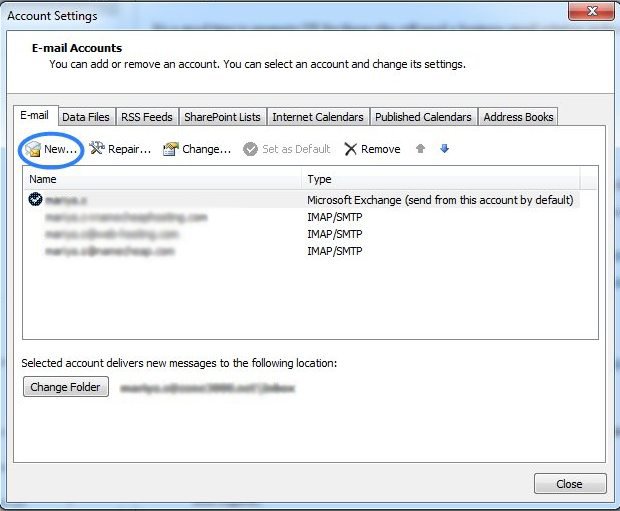
Hello Dear users, As we know that We have Email account option in cPanel default, According to limit of email account creation we can create number of email address.
If we want to check our emails then we login to web mail or c Panel. But if we don't want this process then we have an option, We can configure our email address in mail client software.
The Best free Software is Mozilla Thunderbird and the premium Software is Microsoft outlook.
see this video : https://youtu.be/bPueiWCst-w or follow below given process.
- Today I am shearing an Video tutorial for know how to add cPanel email address to outlook software.
- Today at first we will login to cPanel.
- Go to Email account section and create an mail address.
- Then we will go to outlook software.
- On outlook we will go to file tab and click on add account button.
- Then we will use Manual setup or additional type server.
- Now we will choose POP or IMAP.
- In next window we will fill all details.
then we have more settings in right bottom corner .
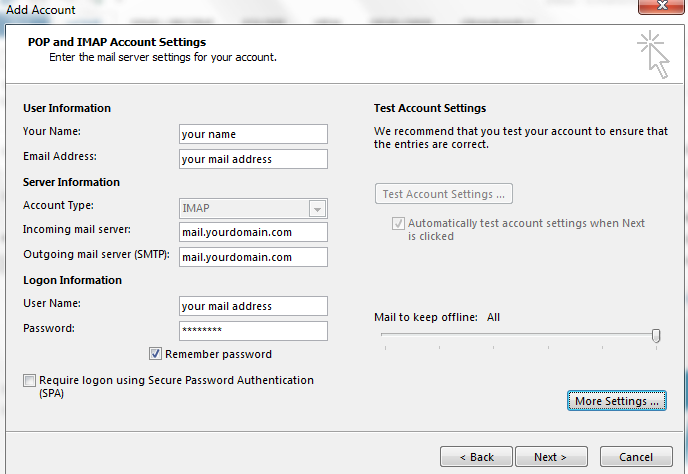
- After fill details please click on More settings.
- In second tab please select option or click fill details according to your server need.
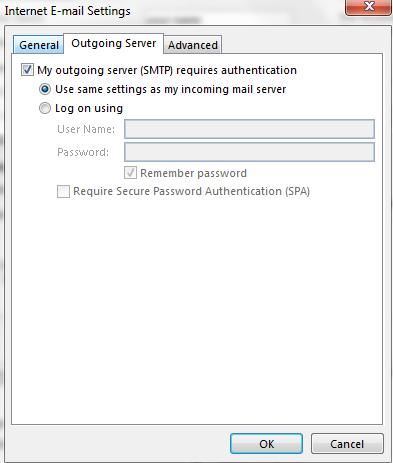
- In next tab please fill port number and type. For this details please check welcome mail of cPanel in your created mail address mail box. Or check in cpanel or contact to your hosting provider.